Technical Architecture Design
AI Agents as “Managed Service” (Enterprise Edition)
As of: April 2026
Model: Managed Service Provider (MSP) / Single-Tenant
Focus: 100% Data Isolation, IaC Automation, Zero-Downtime Deployments, GDPR Compliance.
1. Executive Summary & Control Plane vs. Tenant
The foundation of Blue Agency relies on the strict separation of central agency infrastructure (Control Plane) and isolated client environments (Tenant Nodes). Instead of a multi-tenant database, each client receives a dedicated Hetzner VM (Single-Tenant). This guarantees the highest data security, predictable costs, and enterprise compliance, as a data leak between clients is technically impossible.
2. High-Level Architecture
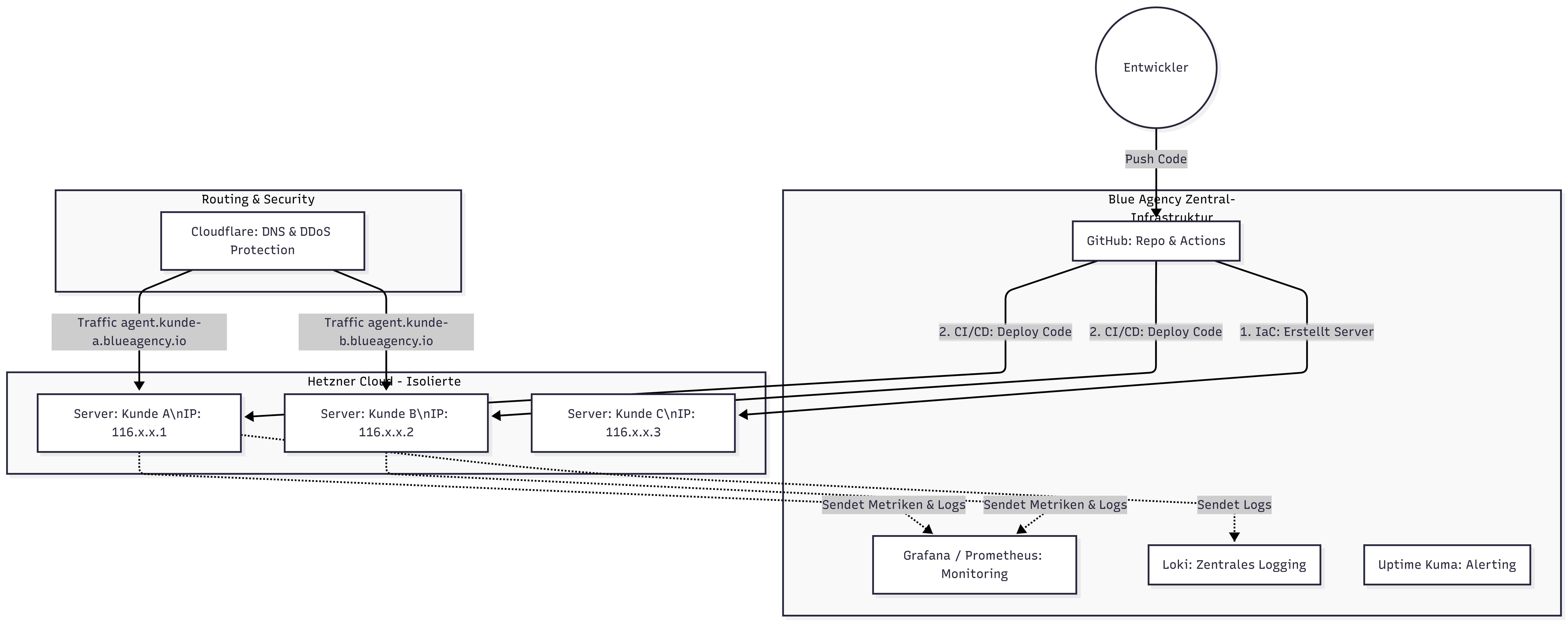
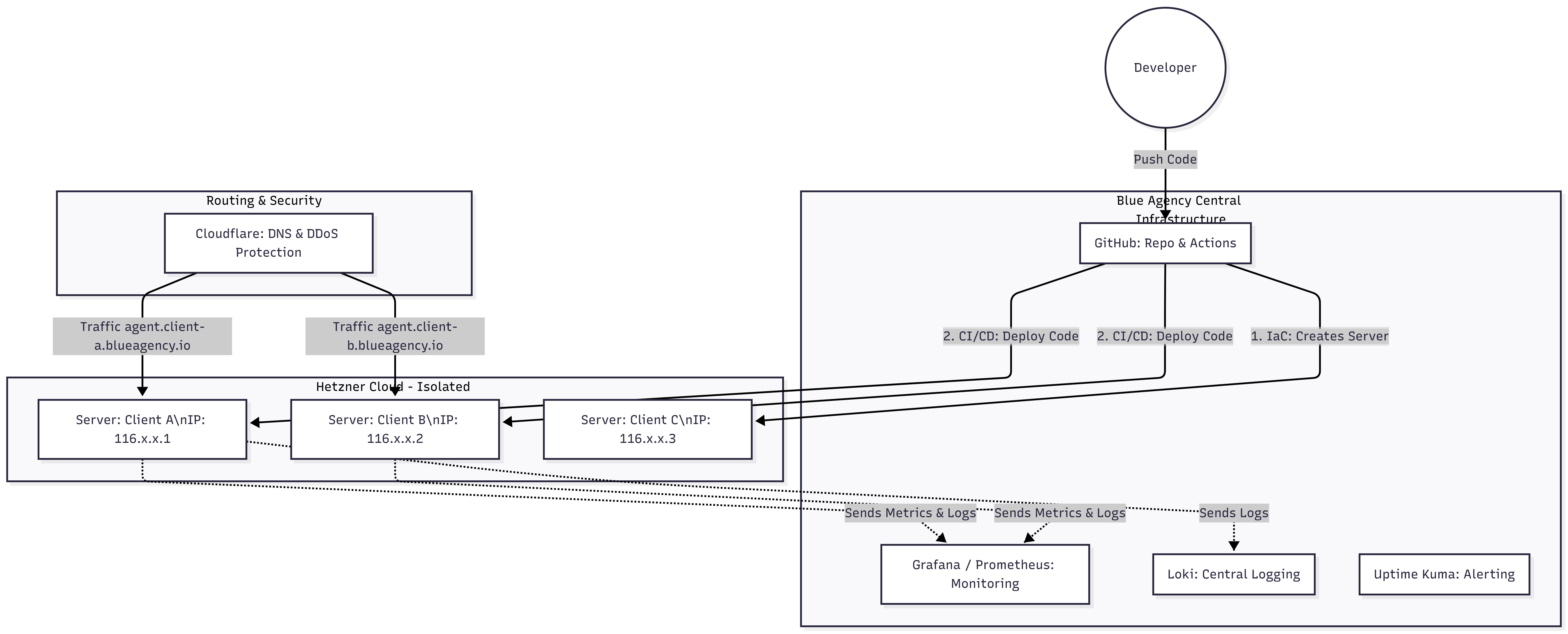
The diagram visualizes the separation between central management and client servers.
🛠️ Show Source Code for the Diagram (Mermaid)
graph TD
    subgraph Control Plane [Blue Agency Central Infrastructure]
        GitHub[GitHub: Repo & Actions]
        Grafana[Grafana / Prometheus: Monitoring]
        Loki[Loki: Central Logging]
        Uptime[Uptime Kuma: Alerting]
    end

    subgraph Internet & DNS [Routing & Security]
        CF[Cloudflare: DNS & DDoS Protection]
    end

    subgraph Tenant Nodes [Hetzner Cloud - Isolated Client Servers]
        NodeA[Server: Client A\nIP: 116.x.x.1]
        NodeB[Server: Client B\nIP: 116.x.x.2]
        NodeC[Server: Client C\nIP: 116.x.x.3]
    end

    Developer((Developer)) -->|Push Code| GitHub
    GitHub -->|1. IaC: Creates Server| NodeC
    GitHub -->|2. CI/CD: Deploy Code| NodeA
    GitHub -->|2. CI/CD: Deploy Code| NodeB

    CF -->|Traffic agent.client-a.blueagency.io| NodeA
    CF -->|Traffic agent.client-b.blueagency.io| NodeB

    NodeA -.->|Sends Metrics & Logs| Grafana
    NodeB -.->|Sends Metrics & Logs| Grafana
    NodeA -.->|Sends Logs| Loki
3. The Tenant Architecture (“AI Employee” Server)
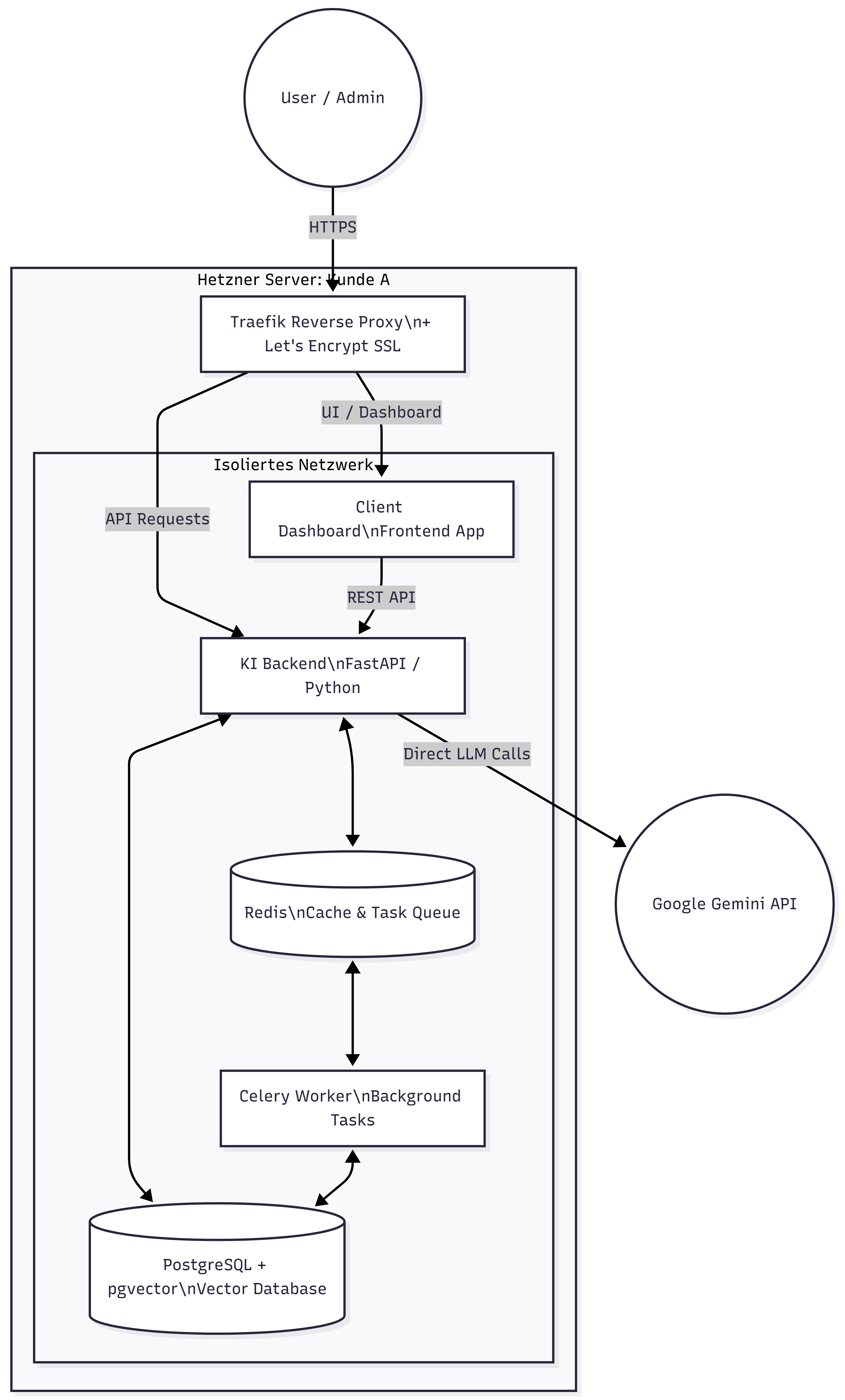
Each client receives a Hetzner Cloud instance (e.g., CX32) with a hardened Docker Compose stack that isolates and securely orchestrates all required system components.
3.1. Components within a Client Server
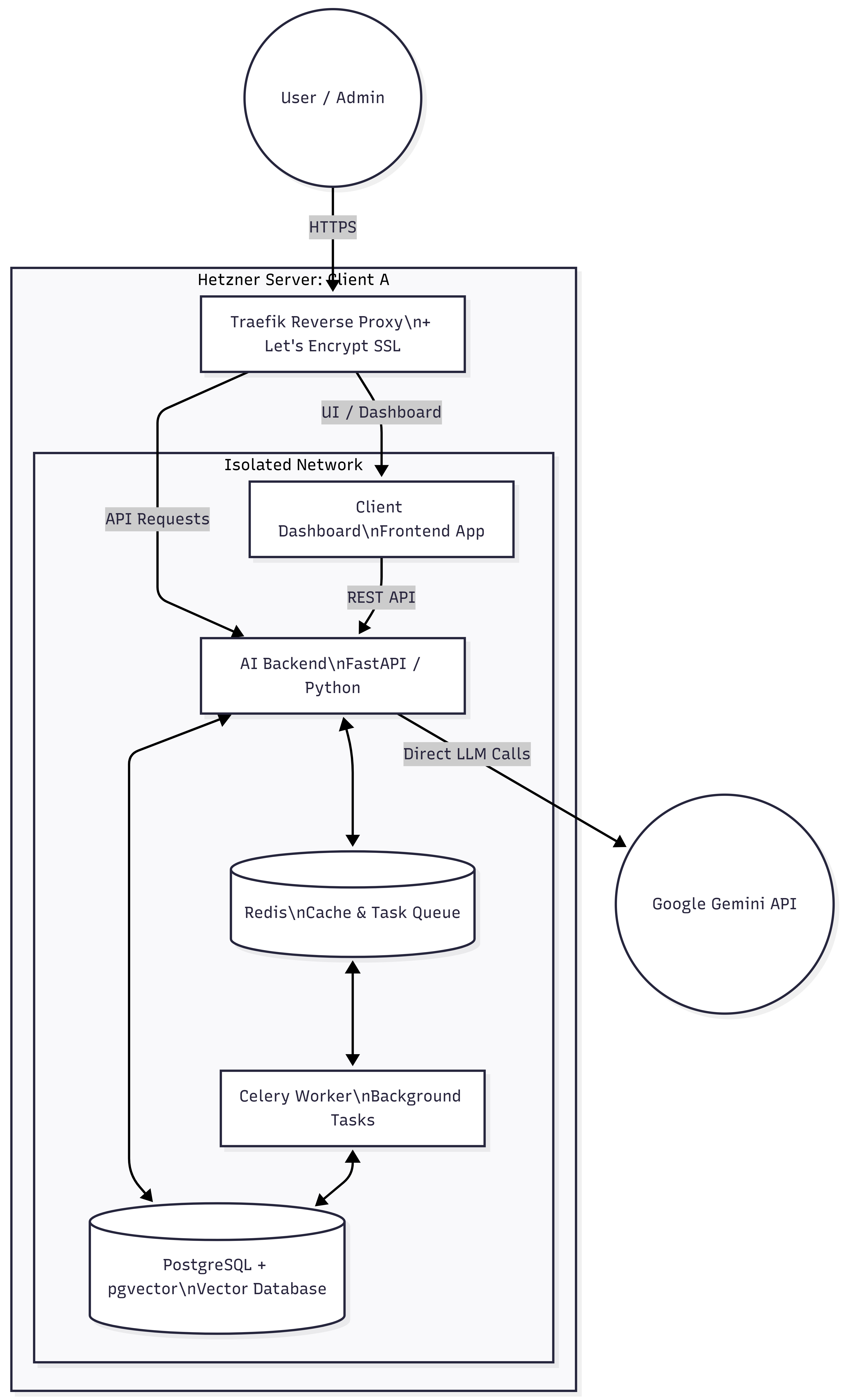
🛠️ Show Source Code for the Diagram (Mermaid)
graph TD
    subgraph Hetzner Server: Client A
        Traefik[Traefik Reverse Proxy\n+ Let's Encrypt SSL]

        subgraph Docker Network [Isolated Network]
            Dashboard[Client Dashboard\nFrontend App]
            FastAPI[AI Backend\nFastAPI / Python]
            DB[(PostgreSQL + pgvector\nVector Database)]
            Redis[(Redis\nCache & Task Queue)]
            Celery[Celery Worker\nBackground Tasks]
        end

        Traefik -->|UI / Dashboard| Dashboard
        Traefik -->|API Requests| FastAPI
        Dashboard -->|REST API| FastAPI
        FastAPI <--> DB
        FastAPI <--> Redis
        Redis <--> Celery
        Celery <--> DB
    end

    User((User / Admin)) -->|HTTPS| Traefik
    FastAPI -->|Direct LLM Calls| Gemini((Google Gemini API))
3.2. Technical Specifications
- Traefik: Reverse Proxy for SSL certificates and traffic routing.
- Client Dashboard: White-label web app for client management of prompts, agents, and history.
- FastAPI (AI Core): Python center for RAG pipelines (Retrieval-Augmented Generation) and direct Google Gemini API connection.
- Redis & Celery: Asynchronous processing of long LLM requests to avoid webhook timeouts.
- PostgreSQL + pgvector: Central database for user data and vector embeddings (RAG knowledge base).
4. Phase 1: Bootstrap Strategy (Clients 1-5)
To efficiently use the initial budget for product quality (the AI agent), complex infrastructure scripts are avoided for the first clients. Enterprise security (Single-Tenant) is fully maintained; only the server creation is done manually. Deployment is professionally automated via GitHub Actions from Day 1.
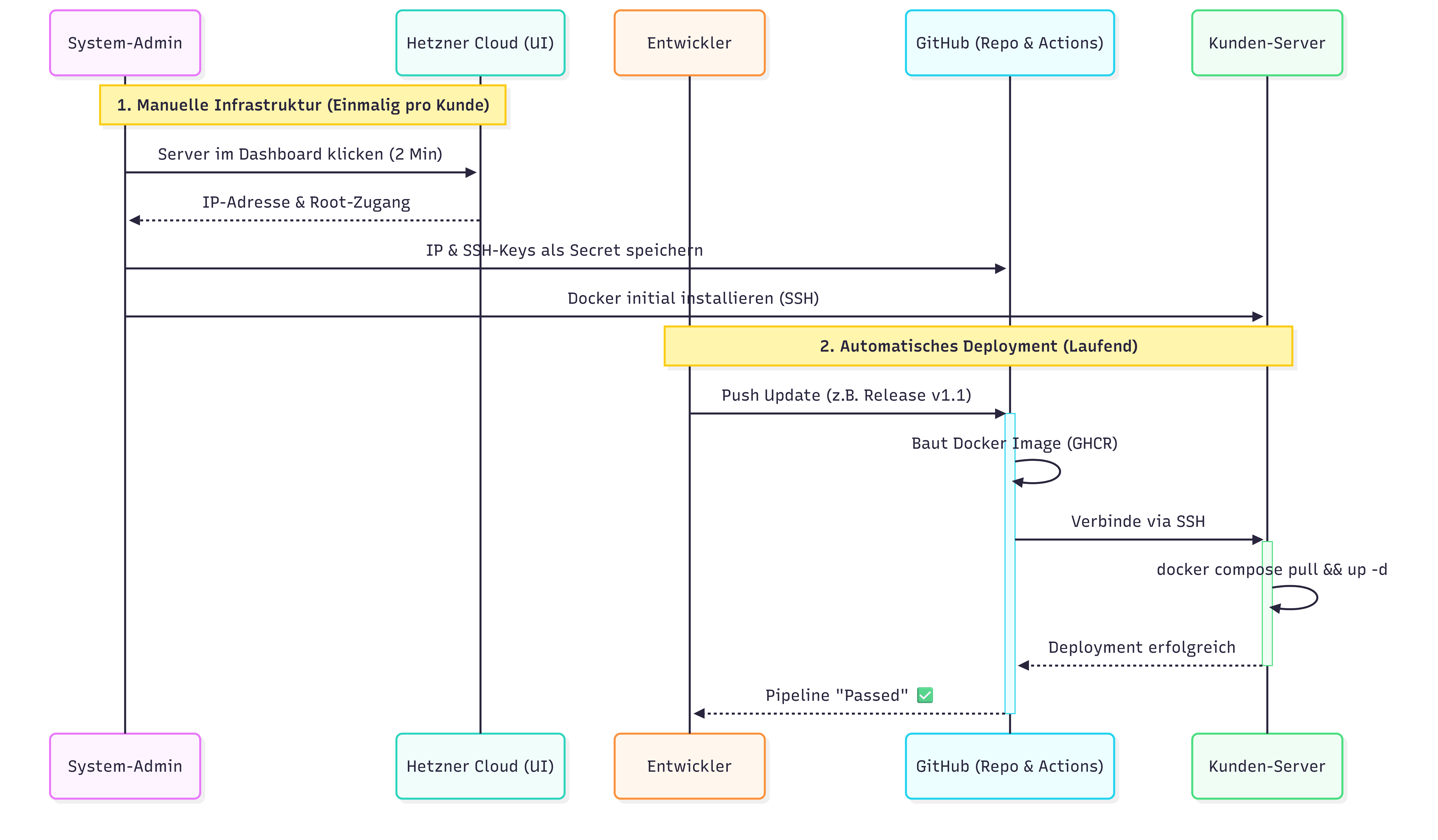
4.1. Flowchart Phase 1 (Semi-Automated)
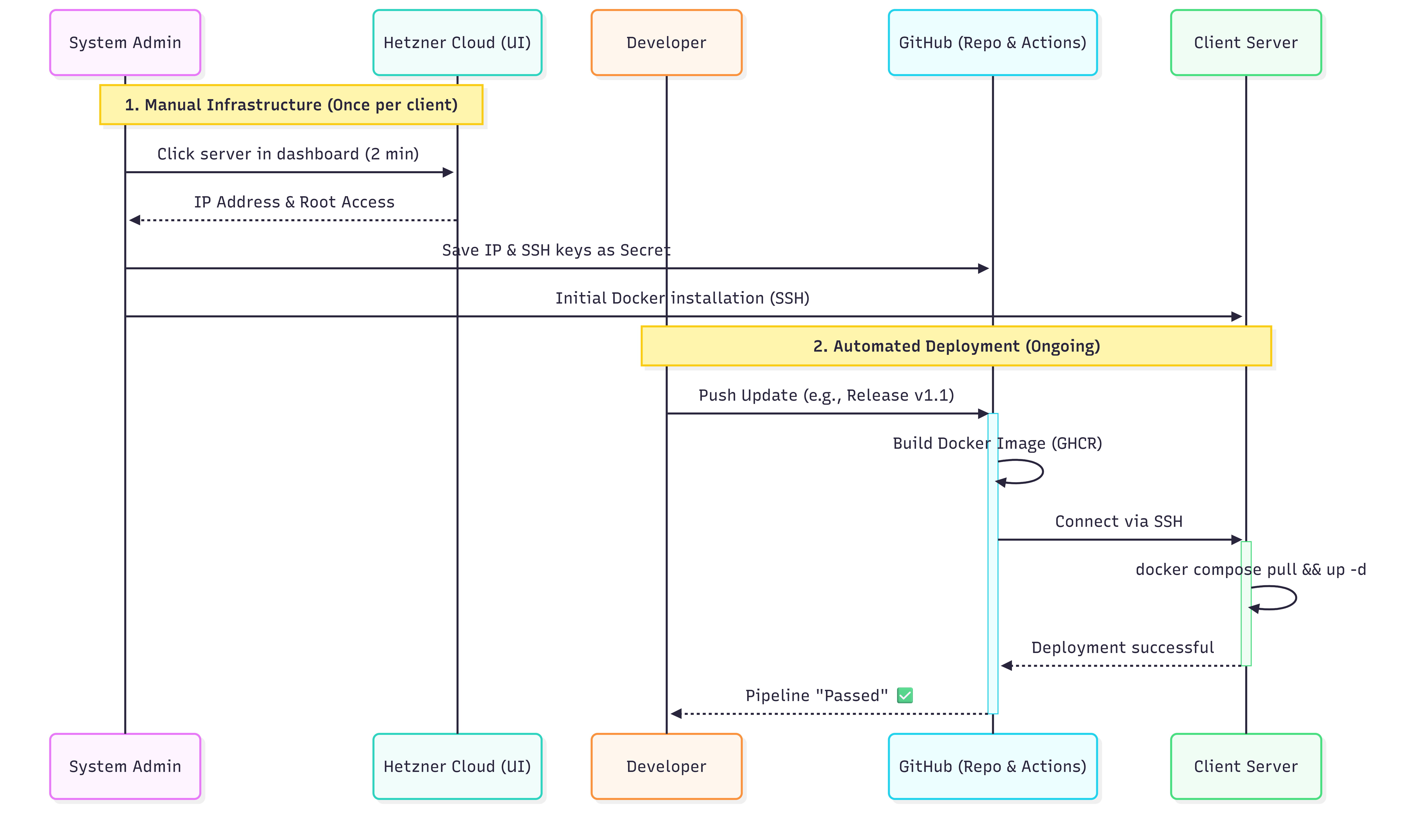
🛠️ Show Source Code for the Diagram (Mermaid)
sequenceDiagram
    participant Admin as System Admin
    participant Hetzner as Hetzner Cloud (UI)
    participant Dev as Developer
    participant GitHub as GitHub (Repo & Actions)
    participant Server as Client Server

    Note over Admin,Hetzner: 1. Manual Infrastructure (Once per client)
    Admin->>Hetzner: Click server in dashboard (2 min)
    Hetzner-->>Admin: IP Address & Root Access
    Admin->>GitHub: Save IP & SSH keys as Secret
    Admin->>Server: Initial Docker installation (SSH)

    Note over Dev,Server: 2. Automated Deployment (Ongoing)
    Dev->>GitHub: Push Update (e.g., Release v1.1)
    activate GitHub
    GitHub->>GitHub: Build Docker Image (GHCR)
    GitHub->>Server: Connect via SSH
    activate Server
    Server->>Server: docker compose pull && up -d
    Server-->>GitHub: Deployment successful
    deactivate Server
    GitHub-->>Dev: Pipeline "Passed" ✅
    deactivate GitHub
4.2. Focus in Phase 1
- Infrastructure: Manual creation of Hetzner servers in the web interface. Saves development costs for Terraform.
- Deployment: Use of a simple GitHub Actions pipeline. A push to the main branch automatically updates the client’s server.
- Monitoring: Use of “Uptime Kuma” on a €3 server for simple ping monitoring (alert on failure), instead of complex Grafana setups.
5. Phase 2 & 3: Scaling & Full Automation (From Client 6)
As soon as recurring revenue (MRR) is secured, the system will be fully automated to eliminate manual friction points.
5.1. Rollout Process (Fully Automated)
🛠️ Show Source Code for the Diagram (Mermaid)
sequenceDiagram
    participant Dev as Developer
    participant GitHub as GitHub (Repo & Actions)
    participant Hetzner as Hetzner API (Terraform)
    participant Server as Client Server (Ansible)

    Dev->>GitHub: Push Update (e.g., Release v2.1)
    activate GitHub
    GitHub->>GitHub: Builds & stores Docker Image

    alt New Client
        GitHub->>Hetzner: Terraform: Create VM & Firewalls
        Hetzner-->>GitHub: Return IP Address
        GitHub->>Server: Ansible: Initialize OS & Docker
    end

    GitHub->>Server: Ansible: Connect via SSH
    activate Server
    Server->>Server: docker compose up -d (Zero-Downtime Reload)
    Server-->>GitHub: Deployment successful
    deactivate Server
    deactivate GitHub
5.2. Infrastructure & Configuration Management
- Terraform (IaC): Communicates with the Hetzner API for the fully automated creation of the VM, Cloud Firewall, and Storage Volumes.
- Ansible: Handles server hardening (Fail2Ban, SSH keys) and the secure rollout of container configurations (incl. secret management via GitHub).
6. Security & Backups
- Network Security: Cloudflare DNS, strict Hetzner Cloud Firewall (only Port 80/443 & dedicated agency SSH access).
- Backup Strategy:
- Daily Hetzner Image Snapshots.
- Encrypted PostgreSQL dumps (every 4 hours) to an external Hetzner Storage Box.
- Automatic mirroring of vector database volumes.
7. Monitoring & Logging (Phase 3)
Proactive monitoring via the Control Plane:
- Loki / Promtail: Centralization of logs from all decentralized tenant containers.
- Prometheus: Monitoring of system resources (RAM, CPU, Disk) with automated alerting.
- Grafana: Analysis of application metrics (LLM Token Usage, API Response Times from Gemini).
8. Summary of Resources
Initially required Control Plane infrastructure:
- GitHub: SaaS for code, CI/CD pipelines, and Container Registry (GHCR).
- Management Node (Hetzner CPX31): Hosts Grafana, Prometheus, Loki (relevant from Phase 2).
- Backup Storage (Hetzner Storage Box): Central, secure archive for client database dumps.